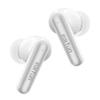
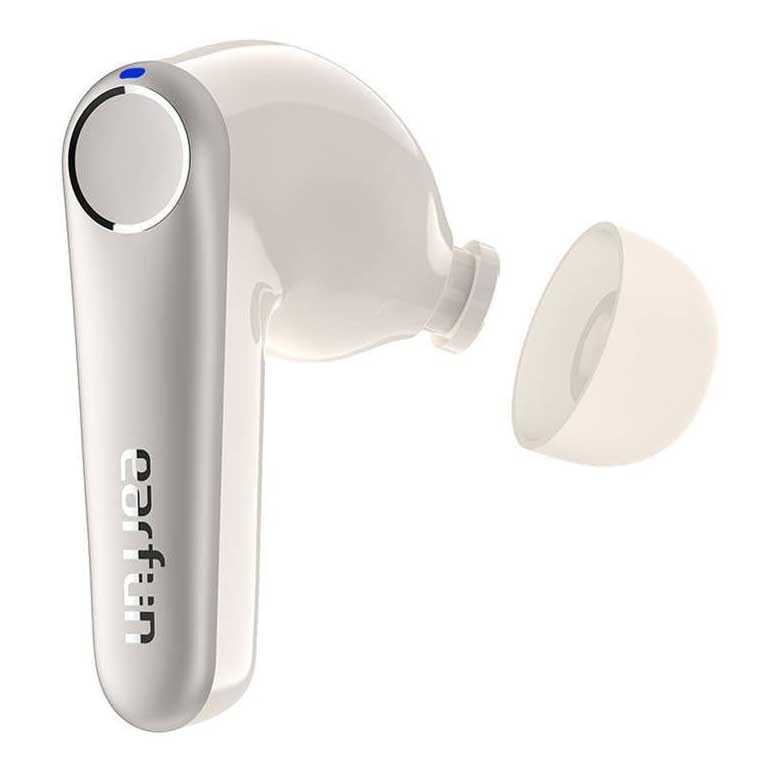
🏅【VGP 2023 Gold Award & Planning Award / Qualcomm's Cutting-Edge Chip QCC3071】Winner of the Gold Award and Planning Award at "VGP 2023," Japan's largest audio-visual awards! 👍 Utilizing Qualcomm's cutting-edge chip "QCC3071," it supports the high-resolution equivalent (24bit/96kHz) aptX Adaptive codec and Bluetooth 5.3, achieving more stable connectivity and high sound quality. aptX Adaptive automatically adjusts the bitrate according to the listening environment, enabling optimal music playback for each situation. 🎶 Equipped with an 11mm diameter wool dynamic driver, it reproduces a well-balanced sound from powerful bass to smooth mid-high frequencies, delivering sound closer to the original. *Please note that the earphone body is off-white and the face cover is silver-white, not pure white.
🏅【Industry-leading ANC-43dB/Multipoint Connection】Utilizing hybrid ANC technology and EarFun's proprietary "QuietSmart 2.0" technology, it achieves noise reduction of up to 43dB in the audible range (value obtained through precise testing under specific conditions). Three operating modes are available: "Noise Cancelling Mode," "Normal Mode," and "Ambient Sound Mode," providing a comfortable music experience according to your needs. ✨Supports multipoint connection, allowing simultaneous connection to up to two devices such as iOS, Android, and PCs, and enjoy music and calls with smooth switching. *To achieve better noise cancellation, both left and right earphones must be worn simultaneously. Choose the ear tip size that fits you and wear them in the correct position.
🏅【6 Microphones/cVc8.0 Call Noise Reduction Support】Equipped with 6 high-performance microphones on each side, and employing cVc8.0 call noise reduction technology. By optimizing the position of the call microphones, it reduces noise in noisy environments such as restaurants, subways, bars, and busy areas by up to 90%, transmitting clear voice to the other party. ✅Furthermore, EarFun's unique QuietSmart2.0 eliminates wind noise by up to 90%, ensuring clear calls even in windy environments. Note: Earphones cannot block 100% of call noise, so please make calls in a relatively quiet environment. When wearing the earphones correctly and rotating them, make sure the handle faces your mouth to maximize the pickup of the person speaking during a call.
🏅【55ms Ultra-Low Latency/Dedicated App】Turning on low latency mode reduces latency to 55ms (0.05s), improving your video viewing and gaming experience. *Since this mode shortens the communication range, it is recommended to turn off low latency mode when listening to music. 📱Using the dedicated app (EarFun Audio), you can freely adjust sound quality and noise cancellation. You can also turn low latency mode on/off and make various customizations. *If you still find the sound too loud even after setting the earphone volume to the lowest setting, try adjusting the six points in the app's equalizer down to -10. *The app does not require mandatory registration, so you can use it easily.
🏅【45 Hours of Continuous Playback】The earbuds alone offer up to 9 hours of continuous music playback, and with the charging case, you can enjoy up to 45 hours of playback. It also supports wireless charging and fast charging, allowing for 2 hours of use with just 10 minutes of charging. To extend the life of your earbuds and charging case, regularly clean the charging contacts on the earbuds and case with a cotton swab or wet wipe.
Please note: ① Clean the charging terminals on the earphones and charging case after use and regularly. Keeping the charging terminals clean and dry will ensure proper charging. ② Avoid dropping the earphones and case to prevent damage. ③ Select the appropriate eartips so that they fit snugly in your ear canal and provide good noise cancellation. ④ Keep your ears and earphones clean and regularly remove any foreign objects from the earphones.
Troubleshooting: ① If one earbud is not producing sound or cannot be paired, delete the connection history, reset the earbuds, and then reconnect. ② Use a device with Bluetooth functionality, turn on the Bluetooth function, and then connect and use the earbuds. ③ Make calls in an environment where you can receive a good signal. When using earbuds, avoid crowded places and environments with strong radio interference. ④ If you cannot hear sound even after connecting the earbuds, check whether the earbuds are selected as the audio output device.
Explanation: ① Active Noise Cancellation (ANC) technology uses a microphone to pick up low-frequency noise such as traffic noise and neutralize it before it reaches your ears. It cannot completely block out noise of all frequencies. ② When you place the earbuds in the charging case and close the lid, the earbuds will automatically turn off. ③ When both earbuds are connected simultaneously during a call, only the main earbud's microphone will pick up the speaker's voice. If you want to make a call using only one earbud, place the other earbud in the charging case and close the lid to disconnect it.




 Rimborso per mancata consegna

![[VGP 2023 Gold Award] Auricolari wireless EarFun Air Pro 3 con ANC [Cancellazione del rumore fino a Bluetooth 5.3 + 43dB] Dotati di chip QCC3071](https://img.joomcdn.net/897be1ae9c884b4cde51dc2dcf4fe73618820de7_100_100.jpeg)